Building a website is easy today. Building a website that Google loves is a completely different challenge.
Many business owners spend thousands of rupees on website design, only to discover that their website never appears in search results. The reason is simple: Google doesn’t rank websites based only on how beautiful they look. It ranks websites that are fast, useful, trustworthy, easy to crawl, and designed to help users solve real problems. Modern SEO in 2026 revolves around user experience, helpful content, technical optimization, and trust signals. Google’s Search Essentials continue to emphasize people-first content, site performance, and accessibility as core ranking considerations.
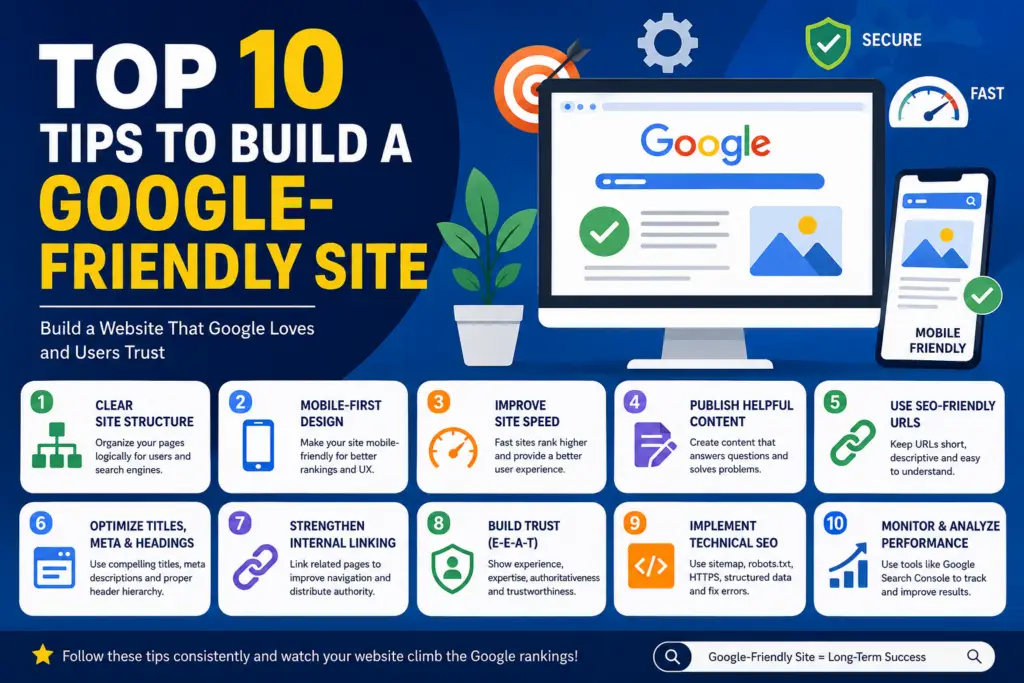
Why Google-Friendly Websites Matter in 2026
A Google-friendly website is one that search engines can easily crawl, understand, and rank. Think of Google as a librarian managing billions of web pages. If your website is poorly organized, loads slowly, or lacks useful information, the librarian struggles to understand where it belongs. When that happens, your pages remain buried beneath competitors.
Search behavior has evolved significantly. Google’s algorithms increasingly evaluate user satisfaction, page experience, content quality, and trustworthiness rather than simple keyword placement. AI-powered search experiences are also pushing websites to become more authoritative and genuinely helpful. Websites that prioritize user experience tend to perform better because Google’s ultimate goal is to provide the best answer to every search query.
For small businesses, freelancers, bloggers, and eCommerce stores, a Google-friendly website means more organic traffic, lower advertising costs, higher conversions, and stronger brand credibility. Instead of constantly paying for visitors through ads, you build a long-term asset that attracts customers naturally.
Tip #1 – Create a Clear Website Structure
Website structure is one of the most overlooked SEO factors. Imagine entering a supermarket where products are scattered randomly across the floor. You would leave immediately. Google feels the same way about poorly organized websites.
A clear structure helps both users and search engines navigate your content efficiently. Important pages should be accessible within a few clicks from the homepage. Categories, services, blog posts, and landing pages should be grouped logically. Search engines use this structure to determine which pages are most important and how different topics relate to each other. Well-organized sites typically experience better crawl efficiency and stronger rankings.
Hub-and-Spoke Content Organization
One effective strategy is the hub-and-spoke model. A central page covers a broad topic while linking to more detailed subpages. For example, a website development agency could have a “Web Design Services” page linking to separate pages about WordPress development, eCommerce websites, local SEO, and website maintenance. This approach strengthens topical authority and makes navigation easier for visitors.
Tip #2 – Make Your Website Mobile-First
Mobile devices now generate the majority of web traffic worldwide. Google uses mobile-first indexing, meaning it primarily evaluates your website’s mobile version when determining rankings. If your mobile experience is poor, your rankings will suffer regardless of how good your desktop version looks.
Many website owners still design for desktop screens and then adjust for mobile later. That approach no longer works. Mobile design should be the starting point. Text should be readable without zooming, buttons should be easy to tap, and navigation should remain intuitive on smaller screens.
Mobile User Experience Best Practices
Users expect seamless browsing experiences. Pages should load quickly, menus should be simple, and forms should require minimal effort. Avoid intrusive popups that block content and frustrate mobile visitors. A responsive design ensures your website automatically adapts to different screen sizes without sacrificing usability. Mobile-friendly websites not only rank better but also convert visitors into customers more effectively.
Tip #3 – Improve Website Speed
Speed has become one of the most important ranking factors. Every extra second of loading time increases the likelihood that visitors will abandon your website. Fast websites create positive user experiences, reduce bounce rates, and improve conversions.
Google measures performance using Core Web Vitals, a set of metrics designed to evaluate real-world user experiences. These metrics focus on loading speed, visual stability, and responsiveness. Websites that meet Core Web Vitals standards generally perform better in search results.
Core Web Vitals Explained
| Metric | Recommended Target |
|---|---|
| Largest Contentful Paint (LCP) | Under 2.5 seconds |
| Cumulative Layout Shift (CLS) | Below 0.1 |
| Interaction to Next Paint (INP) | Under 200ms |
To improve speed:
- Compress images using WebP or AVIF formats
- Use quality hosting
- Enable browser caching
- Minify CSS and JavaScript
- Implement lazy loading
- Use a CDN when appropriate
These improvements can significantly enhance user satisfaction and SEO performance.
Tip #4 – Publish Helpful Content
Content remains the foundation of SEO. However, today’s Google rewards content that genuinely helps people rather than content created solely to rank for keywords.
Helpful content answers real questions, solves actual problems, and demonstrates experience. Google increasingly evaluates content through E-E-A-T principles: Experience, Expertise, Authoritativeness, and Trustworthiness. Websites that show firsthand knowledge often outperform generic content generated without practical experience.
Understanding Search Intent
Before creating content, determine why users are searching. Are they looking for information, comparing products, or ready to buy?
Different search intents require different content formats:
| Search Intent | Content Type |
|---|---|
| Informational | Guides, tutorials, blogs |
| Commercial | Comparisons, reviews |
| Transactional | Product pages, service pages |
| Navigational | Brand-focused pages |
Matching content to search intent dramatically increases your chances of ranking well.
Tip #5 – Use SEO-Friendly URLs
URLs act like street addresses for your web pages. Clean, descriptive URLs help both users and search engines understand page content before even opening it.
Good example:
yourwebsite.com/wordpress-development-services
Poor example:
yourwebsite.com/page?id=5873
Descriptive URLs improve readability, increase click-through rates, and provide additional context for search engines. Keep URLs short, keyword-focused, and easy to understand. Avoid unnecessary parameters, numbers, and special characters whenever possible.
Tip #6 – Optimize Titles, Meta Descriptions, and Headings
Think of your title tag as your website’s billboard on Google search results. It’s often the first thing potential visitors see. A compelling title encourages clicks while helping Google understand the page topic.
Meta descriptions don’t directly influence rankings, but they significantly impact click-through rates. An engaging description can attract more visitors even when competing against higher-ranking pages. Properly optimized headings also improve readability and content structure.
Proper Header Hierarchy
Use headings logically:
- H1 for the main topic
- H2 for primary sections
- H3 for subsections
- H4 for supporting details
A clear heading hierarchy helps both readers and search engines understand content organization. Structured content is easier to scan, making users more likely to stay on your website longer.
Tip #7 – Strengthen Internal Linking
Internal links connect pages within your website. They help distribute authority, guide visitors, and assist search engines in discovering content.
Many websites publish valuable content but fail to connect related pages. As a result, important pages remain isolated and receive little visibility. Strategic internal linking creates pathways that encourage visitors to explore more content while helping Google understand topical relationships.
A strong internal linking strategy should:
- Link related content naturally
- Use descriptive anchor text
- Highlight important service pages
- Connect blog posts to commercial pages
- Maintain logical topic clusters
Over time, this improves crawlability and strengthens overall site authority.
Tip #8 – Build Trust Through E-E-A-T
Trust is becoming a major competitive advantage in SEO. Google wants to rank content created by people who know what they’re talking about.
E-E-A-T stands for Experience, Expertise, Authoritativeness, and Trustworthiness. While not a direct ranking factor, it influences how Google evaluates content quality and credibility. Websites lacking trust signals often struggle to compete in competitive niches.
Experience and Expertise Signals
Practical ways to demonstrate E-E-A-T include:
- Publishing author biographies
- Showcasing real-world case studies
- Displaying testimonials and reviews
- Updating content regularly
- Providing transparent contact information
- Referencing credible sources
Users trust businesses that appear genuine, and Google’s algorithms increasingly reflect that preference.
Tip #9 – Implement Technical SEO Basics
Technical SEO ensures that search engines can discover, crawl, and index your website correctly. Even exceptional content can struggle if technical issues prevent Google from accessing it.
Technical optimization doesn’t require advanced programming knowledge. Most modern CMS platforms, including WordPress, provide tools and plugins that simplify implementation. The goal is to remove obstacles between your content and search engines.
Sitemap and Indexing Essentials
Every website should have:
- XML sitemap
- Robots.txt file
- HTTPS security
- Proper redirects
- Canonical URLs
- Structured data where relevant
- No broken links
These elements help Google crawl your website more efficiently and understand page relationships more accurately.
Tip #10 – Monitor Performance with SEO Tools
SEO is not a one-time task. Rankings, traffic, and user behavior constantly change. Successful websites continuously monitor performance and make improvements based on data.
Without analytics, you’re essentially driving with your eyes closed. Tracking tools reveal which pages perform well, which keywords generate traffic, and where technical issues exist. This information helps prioritize future improvements.
Google Search Console Benefits
Key benefits include:
- Keyword performance tracking
- Indexing status monitoring
- Mobile usability reports
- Core Web Vitals analysis
- Technical issue alerts
Combined with analytics software, Search Console provides valuable insights into how Google views your website.
Common Mistakes That Hurt Google Rankings
Many websites fail because of avoidable mistakes.
Common issues include:
| Mistake | Impact |
|---|---|
| Slow loading pages | Higher bounce rates |
| Thin content | Lower rankings |
| Poor mobile experience | Reduced visibility |
| Broken internal links | Crawl problems |
| Duplicate content | Ranking confusion |
| Keyword stuffing | Quality penalties |
| Ignoring Search Console | Missed opportunities |
Google increasingly rewards websites that focus on user satisfaction rather than manipulation.
Essential Google-Friendly Site Checklist
Before launching or redesigning a website, verify:
✅ Mobile-friendly design
✅ Fast loading pages
✅ Secure HTTPS connection
✅ XML sitemap submitted
✅ Clear site structure
✅ SEO-friendly URLs
✅ Internal linking strategy
✅ Helpful content
✅ Optimized metadata
✅ Search Console installed
Completing this checklist establishes a strong SEO foundation for long-term growth.
Conclusion
Building a Google-friendly website isn’t about chasing algorithm tricks. It’s about creating a website that serves users exceptionally well while making it easy for search engines to understand your content. A clear structure, mobile-first design, fast performance, helpful content, strong internal linking, and trust-building elements work together to create sustainable rankings.
Businesses that consistently focus on user experience and content quality tend to outperform competitors over time. Google continues moving toward rewarding websites that genuinely help people. If you apply these ten strategies, your website will be positioned to attract more organic traffic, generate more leads, and build stronger online authority in 2026 and beyond.
FAQs
1. What makes a website Google-friendly?
A Google-friendly website is easy to crawl, fast-loading, mobile-friendly, secure, and filled with helpful content that satisfies user intent.
2. How important is website speed for SEO?
Website speed is extremely important because it affects user experience, bounce rates, conversions, and Google’s Core Web Vitals ranking signals.
3. Does mobile optimization affect Google rankings?
Yes. Google uses mobile-first indexing, meaning your mobile website experience heavily influences rankings.
4. How often should I update website content?
Review important pages every few months and update outdated information, statistics, screenshots, and examples whenever necessary.
5. Is technical SEO necessary for small business websites?
Absolutely. Even small websites need proper indexing, secure HTTPS, XML sitemaps, and crawlable structures to achieve strong search visibility.